Task 7: Switching Between Open Documents
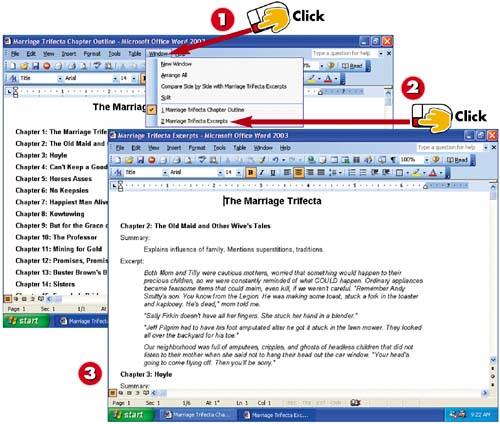

Click Window.

Notice that the current document has a check mark next to its name. Click the document that you want to switch to.

The document you just clicked in the Window menu becomes the active document.
INTRODUCTIONIn most programs, you can work with several documents at once. The number of documents you can have open depends on your system memory and the program. Simply click File and select the Open command to open the files you want to work with. Then you can easily switch between any of the open documents. |
TIPSwitching Documents Versus Programs Don't confuse switching between documents with switching between programs. For more information, refer to Task 4, "Switching Between Programs." |
TIPNo Window Menu? If the program does not have a Window menu, you probably cannot work in multiple documents. For example, in WordPad, you cannot have more than one document open at a time. |


